Using Doenet’s Community Discussions
One way to engage with Doenet’s community is to use our discussion forums at community.doenet.org . The discussions use the same accounts as beta.doenet.org to make it easy to join in the discussion.
The main discussion categories
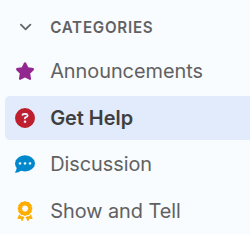
Community discussions has four main categories
-
Announcements. A low traffic category that Doenet organizers use for announcements to the whole community. Unlike all other categories, everyone is, by default, “watching” the announcement category, which means they will receive a notification for each new post. See Changing the notification level to adjust the notification level.
-
Get Help. Here’s where you can ask a question or search for answers to previous questions.
-
Discussion. Our general forum for discussing ideas about Doenet, requesting a feature, or exploring what’s going on in the Doenet community.
-
Show and Tell. You can create short posts here with a link to your activity to alert the community about something you’ve been working on.
Changing the notification level
By default, you will receive notifications for the occasional posts to the Announcement category. For other posts, you will receive a notification only if someone replies to your post or mentions your @name.
To change the notification level for a category, click the bell icon in the upper right corner while viewing a category, as shown below.

The most common options for notification level are:
- Watching (default for Announcements). You will receive a notification for every post.
- Tracking (default for everything else). You won’t receive a notification unless someone replies to your post or mentions your @name. In the Community Discussions page itself, it will display a dot for categories or tags with new activity.
- Watching first post. Like Watching, except you get a notification only for new topics, not for replies to existing topics. (You also get notified if someone replies to you or mentions your @name).